Showing posts with label Blog Enhancement. Show all posts

Claremont Design's Free Wordpress Theme

October 16, 2009
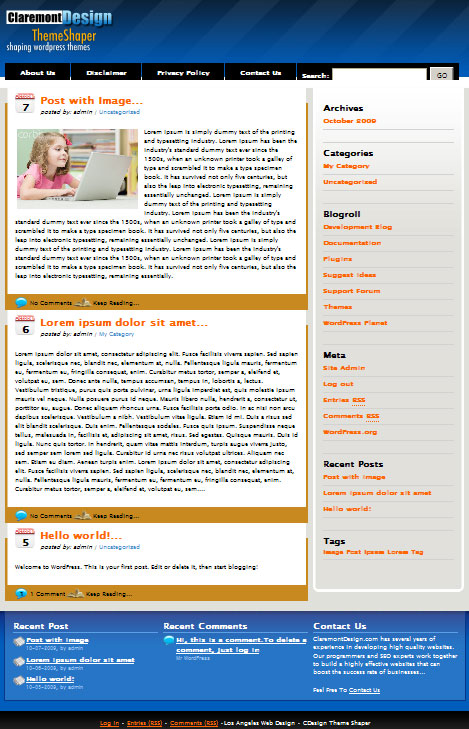
Are you looking for a simple yet elegant free Wordpress theme for your blogs? Then you visit Claremont Design, a Los Angeles web design consulting company in California that offers custom e-commerce web designs, SEO/SEM services and any kind of web designs and consultation with regards to bringing your company online. The said theme is a blue color with right sidebar theme that can be used for your personal or business blogs. These theme is free for use as long as you give back the credits to Claremont Design. Here's the snapshot of the said theme (click on the image to reveal a larger picture):

Now my additional advice is that if you want to make it a SEO friendly theme, use a plug-in like the All-In-One SEO plug-in to optimize your blog well. To download the said theme, go HERE.

Jumping in Joy: I am PR3

April 3, 2009
Whoah, guys did you feel it, tha changes this April 2009? PR or commonly known as PageRank just updated and this blog: Hectic Capiznon Bloggers 2009, gained a big PR3. For those who are not familiar with the term, PageRank is a way of measurement of Google to tag websites for its importance over the search result pages. Its measurement is from 0 to 10, where zero is the least important value while ten is the highest importance a site can gain. So if you have a higher PR the more valuable your site is. Now, you may asked how would you gain a higher value. Actually the algorithm that is used by this seach engine in computing this value is hidden in the eyes of the public. Back in the days, the said algorithm was revealed however some misused this algorithm and abused the power that they've gained from this.

For myself, I uses a simple formula to gain a high PR of my site. See the formula below:

Gaining PR = Quality Unique Contents plus Lot of Backlinks less Outbound Links

Where, quality unique contents refers to a original and non-duplicate contents or non-copy and paste contents. Quality can also be gained by utilizing different medium in your contents such as video and images or pictures other than text. Actually a friend of mine just gained PR4 because of his really "unique" and out of this world content. Lot of backlinks or inbound links on the other hand refers to external/internal pages linking to your targetted site. This can be gained by directory submissions, social bookmarking, blog commenting and exchange links. Outbound link refers to links that are getting out of your site. It should be minimized because too much of this weakens the PR strength of your site for its power is distributed in each external websites. This is the formula that I always used in any engangement I am encountering involving websites or blogs, static or dynamic.

Every individual has its own preferences and in the Hectic Capiznon Bloggers 2009 event, entrants surely uses their own formula or the same as mine but in different perspective.

Making your Blogs to Load Fast

February 26, 2009
Hectic Capiznon Bloggers 2009: Make Blog to Load FastDo you know why is it important to make your blog to loads fast? It is because it enhances the user experience. Blog that immediately shows the content of the site makes your visitors to stay on the blog and not losing their patient waiting for something to come up in the blog. In this post, I will discuss several practical things a blogger should do with their blogs to make it much faster to load. This tweaks and tips that I will include on this are applicable to any blogging platform on the web today such as Blogger, Wordpress, Typepad, Calliope and others.
  1. Use smaller size graphics. I am not referring to the dimension of the image but the file size of the image to use on every posts. Larger pictures loads slower compared to smaller size images. That is why it is recommended to use image types that uses the higher file compression but not losing its picture quality. JPEG files possesses such quality, that is why I am using it instead of other types but if I need graphics that does not lose its transparency and image quality, I use PNG instead. Wise choice of images will increase the load rate of the blog of almost 70% from unoptimized images.
  2. Avoid Javascript rich widgets/gadgets. Some widgets (wordpress.com) or gadgets (blogger.com) that uses Javascripts makes the load of the pages of the site slower compared to non-javascript widgets. If it is not necessary try to avoid it.
  3. Don't populate your blogs with too much 3rd-party ads. 3rd-party advertisers are good way of earning online, however if your pages contains too much advertisers, it will slow down the site. It is because the site needs to fetch information from other websites before loading the actual page. Aside from that some readers are annoyed with too much ads on the site making them to leave immediately when they see this swarming ads.
These minor tweaks on your blogs can really make a difference on how long your visitors will stay and it will also increase the frequency the guests of going back that will eventually become a regular readers of your site.

This tip is intended for the Hectic Capiznon Bloggers 2009 community. Subscribe to my RSS feeds to have a fresh web feeds every time I make post. Later, I will try to provide a means of allowing you my readers to an email subscription scheme so that my posts on this blog will be delivered directly to your inboxes.

Capiz Picture Slideshow Gadget

February 9, 2009
Olotayan Island by Joy Barza in Hectic Capiznon Bloggers 2009Yesterday, I added another blogger gadget on the sidebar of my Hectic Capiznon Bloggers 2009 blog. It is a picture slide show gadget that showcases different photos of the different stunning and eye catching tourist spots of the province of Capiz. These pictures were taken from the Roxas City beach and the Olotayan Island, which I guess can pass to become a candidate of the 7 wonders of the world ( IHMO :) ). The source of these pictures were from one of the great photographer hobbyist / artist and native of Capiz namely Joy Barza and Neil Castano for the Olotayan Island pictures, Harry Talusan for the wonderful sephia effect of the Baybay and People's Park in Roxas City and Allan Toos for the fiery clouds of the rice fields in Culasi. However, these pictures are all in its lower resolution and I did not upload the high resolution of the said pictures as a sign of respect for the owners of the pictures. If you love them then you try to contact the owners. You can leave your comment here so I could ask permission from them if they want it to be distributed online.

How I did this? First I sign-up for an account in Picasa Web, an image hosting owned by Google. Then I added the Slideshow gadget on the sidebar and specified the URL of the Picasa Web album where I uploaded the said pictures. That's it, I did not make any changes on any script or whatsoever. A built-in feature in Blogger blogs. Try it yourself and show off of to the world all of your niciest pictures.

Enhancing your Blogger Blog with Gadgets

February 7, 2009
On my previous post, I mentioned about customizing the design of your blog to enhance its appearance and suit to your taste. Today, I will discuss about how to improve more your blogger blog's appearance by making use of the Google Gadgets. What are Blogger gadgets? See on the right sidebar of this Hectic Capiznon Bloggers 2009 blog. You can find some objects that are not usually found on the default design of your blog accounts such as the Google Maps, Subscribe to RSS and Blogger logo. These are "Gadgets" that I added today to enhance the functionality and appearance of this site. Now, how would you add this elements to your site too? Read the instruction below:

First, go to your Dashboard then click Layout. You will see like the following on this part of the dashboard:

What is shown on this image are the different elements of the page. You can drag the elements that are found on the right and bottom of the page on any location of the site where you want it to be placed. Aside from that you can easily edit the different option of the pages. From the header of the site to the post settings of the site.

To a new gadget, simply click the "Add a Gadget" link and a new window will pop-up showing all the Gadget you can add.

Here's what you can see on the window, a list of different Gadgets categorized in several classifications according to use. What are the gadgets that I used on this Hectic Capiznon Bloggers 2009 blog?

a. Subscription Links. This allows your readers to subscribe with your RSS (Really Simple Syndication) feeds both Posts and Comments. For your information, RSS Feed is web publishing standard format for frequently updated works such as blog entries, news and others. With this, readers around the world can have an easy way of reading your recently added posts. Thus generating a number of return visitors. Common RSS feed formats distributed online today are RSS 2.0 and ATOM. I will discuss abou feeds later.

b. Roxas City, Capiz in Google Maps. Do you know how I did this? Well, I just go to maps.google.com and search for the place then get the LINK of the map which can be easily seen on the right pane of the map. Then I add a new gadget on the blog, specifically HTML/Javascript gadget then paste the map code. That's it!

You could try other gadgets, you just need some imagination to do it and your creativity counts! Have fun with enhancing your site and happy blogging.

Customizing your Blogger Blog Design

February 5, 2009
Do you want to customize your Blogger blog design? Do you wonder how I customized this hectic capiznon blogger 2009 blog on my own without using templates from other Blogger theme providers? This post will discuss to you the different steps I made to make this design possible. From removing the navbar of the blog which usually found at the top of the page to setting your own background picture for the site.

Removing or Hiding the NAVBAR

Let us start with removing the navbar. Navbar is the long found at the top of your blogger blog. First select a Minima theme from the Layout tab of the Dashboard -> Pick New Template. Select the Minima theme as shown on the image. Then in the Layout tab again, choose Edit HTML. This will show you the HTML code of the current theme you have. Paste the NavBar CSS code to the portion as shown below (paste only the code on the green background), then click Save Template to save your changes:
...
[CDATA[/*
-----------------------------------------------
Blogger Template Style
Name: Minima Black
Designer: Douglas Bowman
URL: www.stopdesign.com
Date: 26 Feb 2004
Updated by: Blogger Team
----------------------------------------------- */
#navbar-iframe {
display: none !important;
}
/* Variable definitions
====================

...
Change the Background
Now, after you make this work, the next thing that we need to do is to change the background of the page. First make sure you have a background image uploaded in image hosting sites like ImageShack, Picasa, etc. I recommend that you use at least a background with a resolution of 800x600. Then modify the portion specified on the following code and change the background parameter of the CSS code for the body, as shown below. Don't forget to save the changes you made to see the effect of your changes on your blog.
body {
background:$bgcolor;
margin:0;
color:$textcolor;
font: x-small "Trebuchet MS", Trebuchet, Verdana, Sans-serif;
font-size/* */:/**/small;
font-size: /**/small;
text-align: center;
background: URL(http://yourimageurlhere/imagehere.jpg);
}
Change Font and Color
Next, is to change the color and font of the site to fit on the new selected background that you have. To do this, on the Lay-out tab, click Fonts and Colors then each element of the site, from title, sidebar to the body text are listed on the left side of the window. Choose the appropriate color that you think that fits or blend or passed to your taste. Then save again.

That's it! You have your very own customized templates / theme for your blog on Blogger. You can play with all the CSS code on the template if you want to fit with your desired appearance of your new blog.

If you like this Hectic Capiznon Bloggers 2009 blogging tips, bookmark it using your favorite social bookmarking site. Thanks!